
Overview
If you would like staff to skip learning plans, courses, or learning items, this experience ensures your staff is focused on the most relevant learning. Mark as Completed is often used when your staff has existing mastery on skills or topics covered in learning or has completed learning elsewhere.
How it works
To mark an assignment as completed:
- Navigate to My Staff at https://app.thedoggurus.com/owner/staff
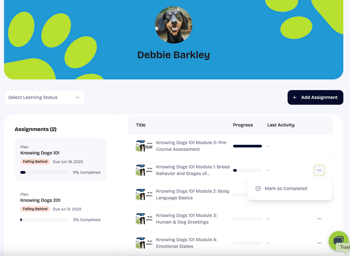
- Select the name of the users for which you would like to mark an assignment as completed
- Click on the vertical ellipses (⋮) to the right the assignment
- Select Mark as Completed
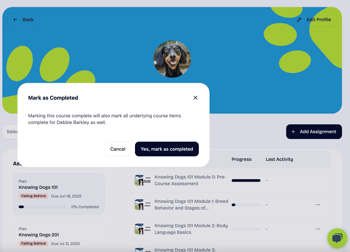
- A confirmation pop-up will appear, select Yes, Mark as Completed
Note, learning plans, courses, or items must be assigned to staff (e.g., Assignment) prior to Mark as Completed showing up.